

Your clinicians’ licensing paperwork, handled.
Confirm tracks supervised hours for the associates and trainees you employ or teach, and CEUs for your licensed staff. They log in a tap, supervisors sign from their phone, and nobody chases a spreadsheet at application time.
Anywhere people are earning or keeping a license.
Group practices and agencies
Associates logging toward licensure, licensed clinicians renewing, and supervisors who sign for both. One tool across the whole ladder.
County and community programs
Many sites, many supervisors, people on more than one track. Confirm keeps each associate’s hours sorted by site and supervisor, so every verification form is ready to sign.
Graduate programs
MFT, counseling and social work students start their Board-level log in practicum, and the same account carries them through associate registration to licensure.
One account for both stages of a career.
Supervised hours
- Sessions come in from Google Calendar or a photo of a planner; a week is confirmed in a tap
- Their State’s rules applied as they go: caps, supervision, hours waiting on supervision
- Weekly logs and Experience Verification forms filled in, per supervisor and site
- Hours from before Confirm read straight off old Board forms
CEUs and renewals
- Snap a certificate and the course is logged with the original on file
- Every license on its own clock, counted against that board’s rules
- Reminders before renewal that say exactly what’s missing
- An audit packet, one PDF, when a board asks
Sign-off without the chase
- See each associate’s progress and any week missing supervision
- E-sign the Board’s own forms from a phone, no printing
- A Monday summary of who needs what
- Licensed staff supervise from the same account they track CEUs in
Everyone’s progress toward licensure, at a glance.
Your organization gets its own page in Confirm. Add your associates and trainees, and once they join you can see how close each one is to licensure, any time, without asking for a spreadsheet.
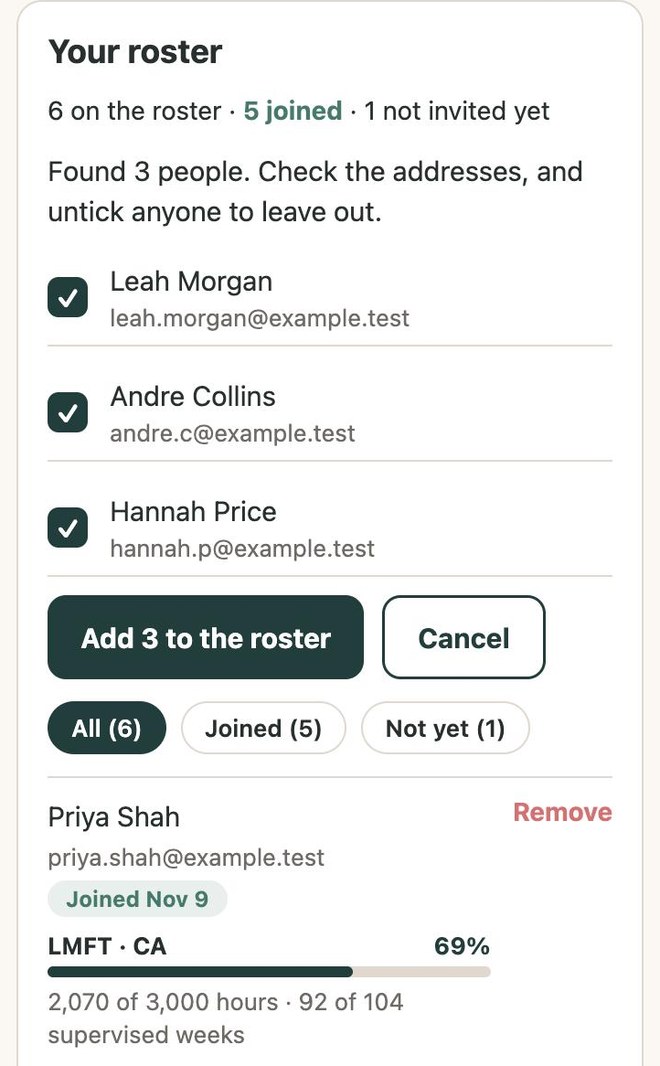
Add your people
Type or paste names and email addresses, or snap a photo of a staff or class list and Confirm reads it for you. Check the list, then add everyone in one go.
Confirm emails each person a sign-up link. Prefer to send it yourself? Copy a ready-made note for your own email or team page.
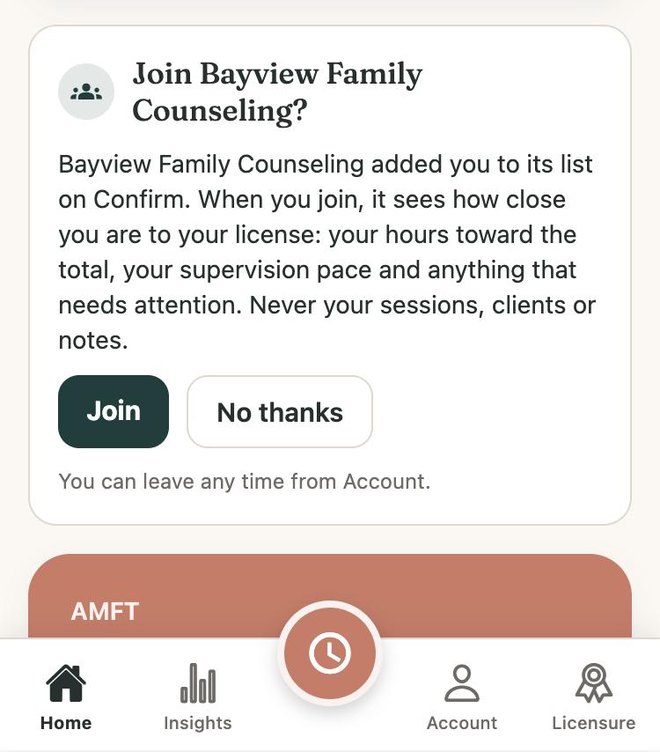
They join in one tap
Each person sets up their own account and logs hours on their phone. Joining your organization is one tap, and Confirm tells them exactly what you’ll see before they do.
- You see their progress toward licensure
- Never their sessions, clients or notes
- They can leave whenever they choose
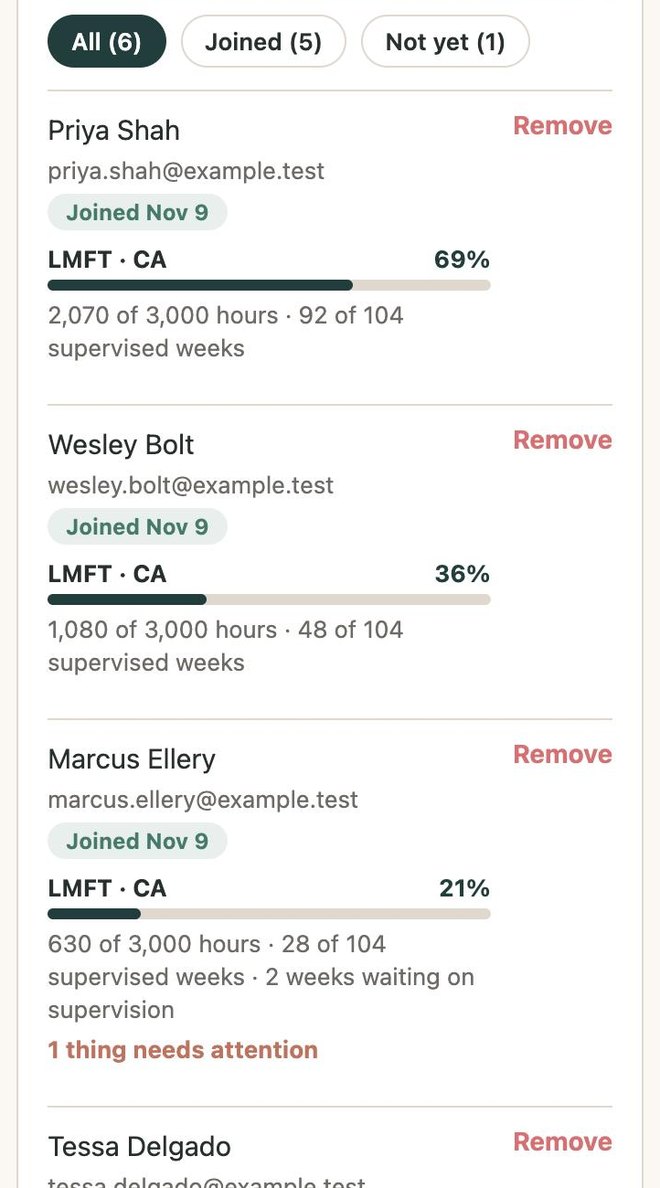
See where everyone stands
One list, always current. For each person who has joined:
- Their license and State, and how far along they are
- Hours toward the total the Board requires
- Supervised weeks toward the minimum
- Weeks still waiting on supervision, and anything else that needs attention
You’ll know who is on track and who needs a hand long before anyone files with the Board.
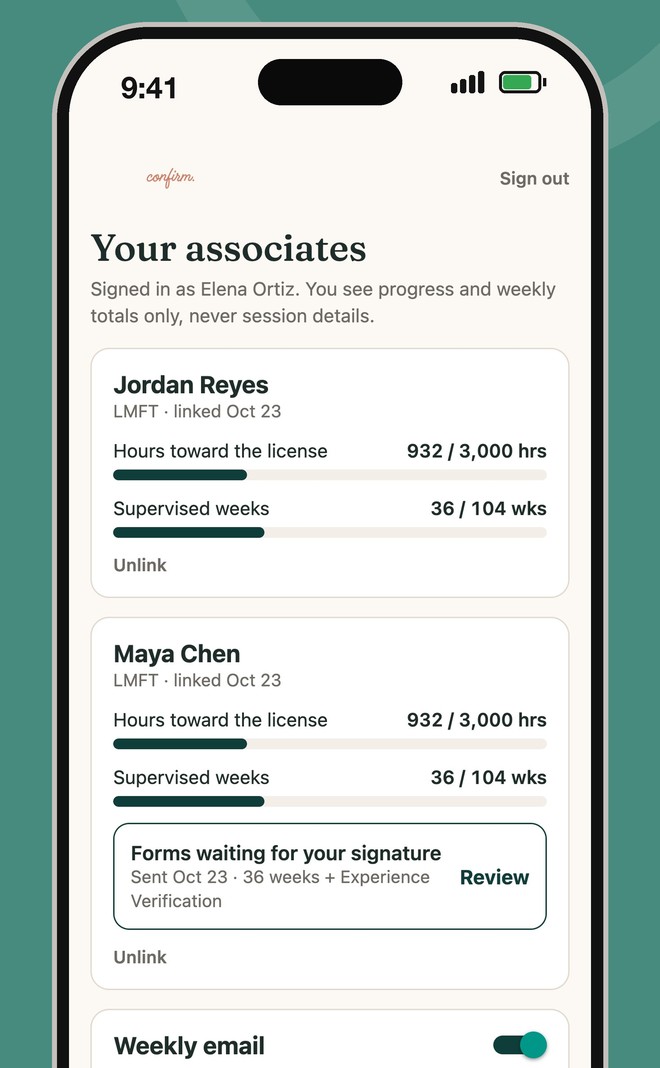
Supervisors sign from their phone
Your supervisors make their own accounts. They see the same progress for the people they supervise, get a Monday summary, and e-sign the Board’s own forms when it’s time. No printing, no chasing.
Works alongside the systems you already use.
Confirm is about the clinician’s license, not the client’s chart. That keeps it simple to adopt and easy to approve.
No client data, by design
There is no field for a client’s name, notes or diagnosis. Confirm records dates, hours, categories, sites and supervisors. Calendar sync takes only each event’s date, time and whether its title matches a keyword; it never keeps titles, attendees or notes.
Nothing to install or connect
It runs in any web browser on a phone or a computer today; iPhone and Android apps are in preparation. No integration with your EHR or scheduling system is needed, or wanted.
Calendar access is read-only and optional
A clinician who connects Google Calendar shares an event’s date and time and whether its title has a keyword they chose. Titles are never stored. Google has verified Confirm’s access.
Keep your own forms
Practicum paperwork and agency timesheets stay as they are. Confirm keeps the Board-level record alongside them and fills the Board’s own forms when it’s time.
Clinicians own their log
Nothing is shared with an employer or program until the clinician joins it in Confirm. Then you see their progress toward licensure, and a supervisor they link sees the same. Never individual entries.
A view for managers and programs
Who has joined, how close each person is to licensure, and whose weeks are waiting on supervision, without exposing anyone’s entries. See it above.
How we get started.
A 30-minute walkthrough
Both sides of Confirm, live, with the founder: what your associates, licensed staff and supervisors would each see. Book one now.
A pilot with one team or cohort
Pick a handful of people. They use it for real for a few weeks during the pilot, and tell us what’s confusing.
An onboarding session
In a staff meeting or a practicum class, everyone sets up their own log in about ten minutes. We run it with you.
Roll out
Plans for organizations are scoped per seat with you, and you’ll have a direct contact for questions.
Common questions.
Does it replace the Board’s forms?
No, it fills them in. Supervisors still review and sign, on the Board’s own form.
Which States?
Supervised hours: live in California, coming soon to Florida, Texas, North Carolina, Washington, Pennsylvania and Maryland. CEU and certification tracking covers all 50 States and DC.
What do we see about each person?
Once they join: their license and State, hours toward the total, supervised weeks or months, weeks waiting on supervision, and a count of anything that needs attention. Never sessions, clients, notes or calendars, and you can’t change anyone’s hours. They can leave at any time.
Is it a compliance guarantee?
No. Confirm tracks and checks; the board’s rules and the supervisor’s signature govern. We show our sources and say so when a rule needs a human look.
Who is behind it?
Steven Swink, LMFT: in mental health since 2008, a decade supervising county mental health and substance use programs, then clinical director and clinical supervisor, and an adjunct professor in a Master’s in Psychology program.
Our work calendars are locked down. Can clinicians still sync?
Yes, once your IT administrator allows Confirm in Google Workspace, which takes a few minutes and is part of getting started with us. Confirm only reads event dates and times, read-only. Until then, clinicians log with a planner photo or by hand. What your IT team needs.
What does it cost an organization?
Seats for clinicians and students are scoped with you, and organizations that start before launch get founding terms.
See it in 30 minutes.
Pick a time that suits you and we’ll walk you through Confirm for your team or program. Prefer to write first? Send us a note.